Interface/GUI
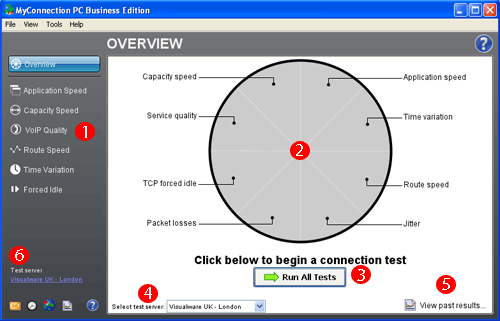
MyConnection PC Main GUI
The numbered points below are related to the numbers on the image above.
1. The menu to the right is the choice of tests MyConnection PC can perform. Clicking on any one will bring up that specific test, which can then be run.
2. The pie chart image denoted by number 2 performs the same task as the list mentioned in number one. Clicking on a particular segment will take you to that test, which can then be run.
3. If you wish to run all the tests then clicking this button will begin the testing.
4. You can choose the test server to perform the tests to by using the drop down menu. Better results are found when using a test location nearest to your actual location.
5. To view past MyConnection PC results click this button.
6. The six buttons denoted by the number 6 allow you to email test results, set up managed testing, run a VisualRoute trace, >view past results or turn on the help indicators. |
